Your clients share mailbox passwords.
Fix it in 20 minutes.
The partner's assistant, the outsourced bookkeeper and the VA all know the password. Move them to their own logins: they read or send from the mailboxes the owner ticks, every action is logged, and access ends when you revoke it.
Where you hear about it
Three tickets you already get
You look after IT for a law office, an accounting practice or an owner-run business. The person whose name is on the mailbox is your client. The person reading it often is not.
The insurance questionnaire
“Is MFA enforced on all email accounts?” “Are credentials shared between users?” MFA on a shared mailbox means the assistant needs the partner's phone. So the honest answer is no.
The paralegal who left
Offboarding means changing the partner's password, then fixing every phone, laptop and scanner that used it. Nobody knows who else had it.
Three providers, one person
The firm is on Microsoft 365. The partner still runs a Gmail address clients use, and an old IMAP box from the previous host. Each one has its own delegation story.
What your client will see
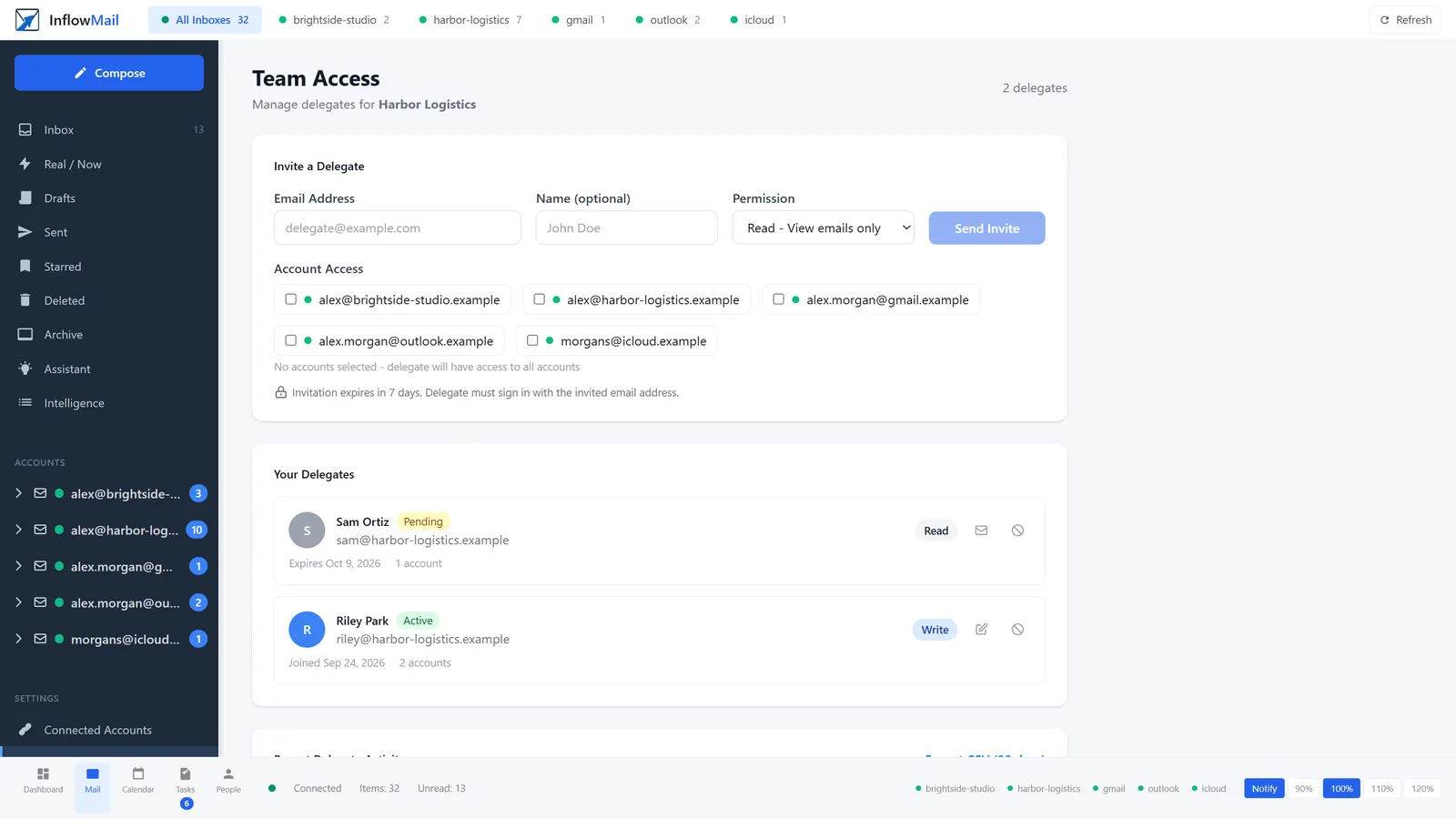
74 seconds, step by step: connect mailboxes once, invite a helper by email, tick their mailboxes and choose read-only or write; they reply from the owner's address; every open, reply, archive and send is logged with time and IP and exports as CSV; revoke ends access immediately.
What InflowMail does
Helpers sign in as themselves
Each helper has their own InflowMail login and can turn on two-factor sign-in. The invite is bound to their email address and expires in seven days. They never see the mailbox password or the OAuth token.
Read or write, per mailbox
The owner picks Read (view and search) or Write (reply, send, archive, delete) and ticks which mailboxes. Recipients see the owner's address.
An activity log you can read
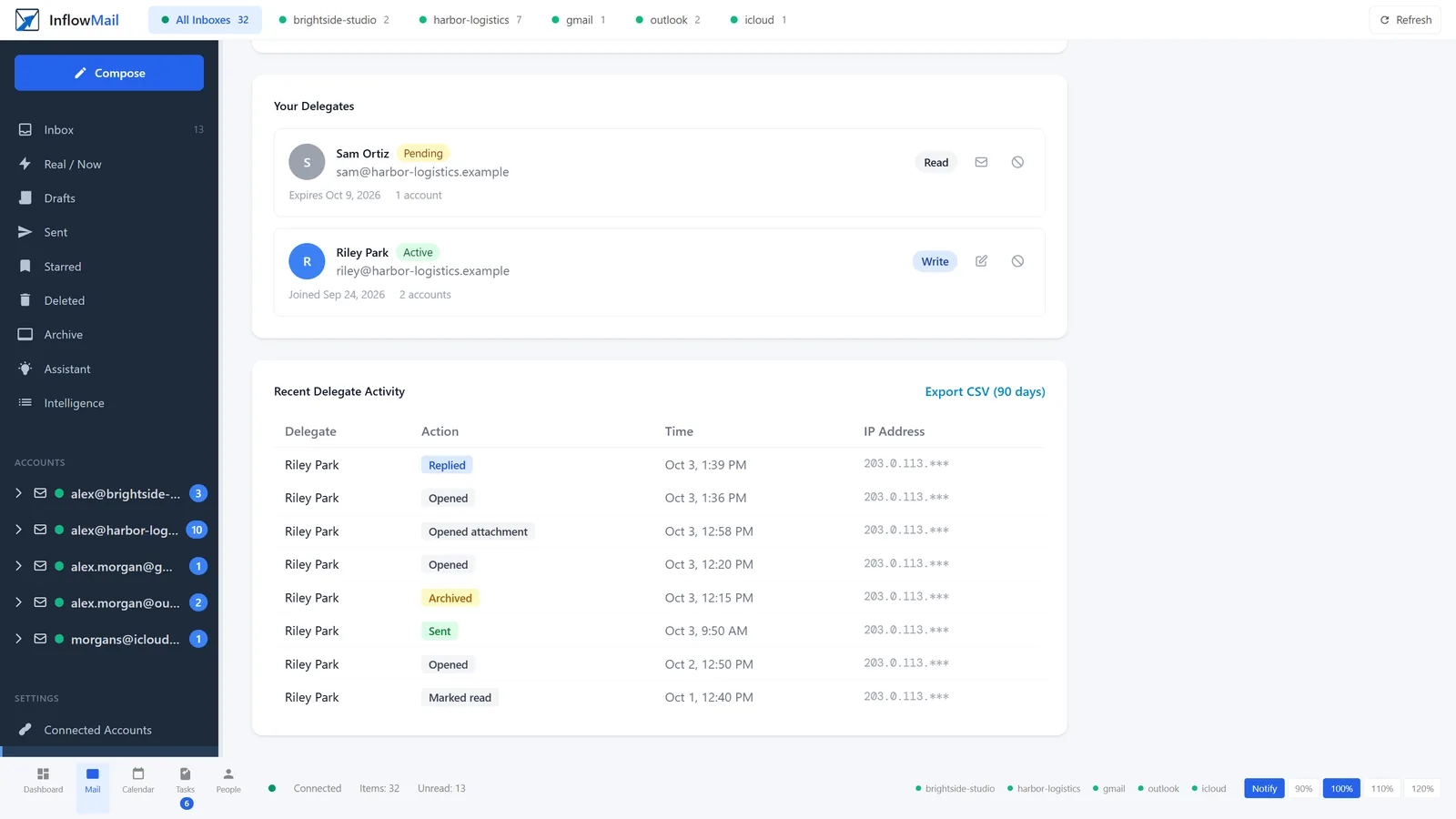
Opens, sends, replies, archives, moves and deletes, by name and time, with the IP address from the apps and API. One-click CSV of 90 days; up to three years through the API.
Revoke once
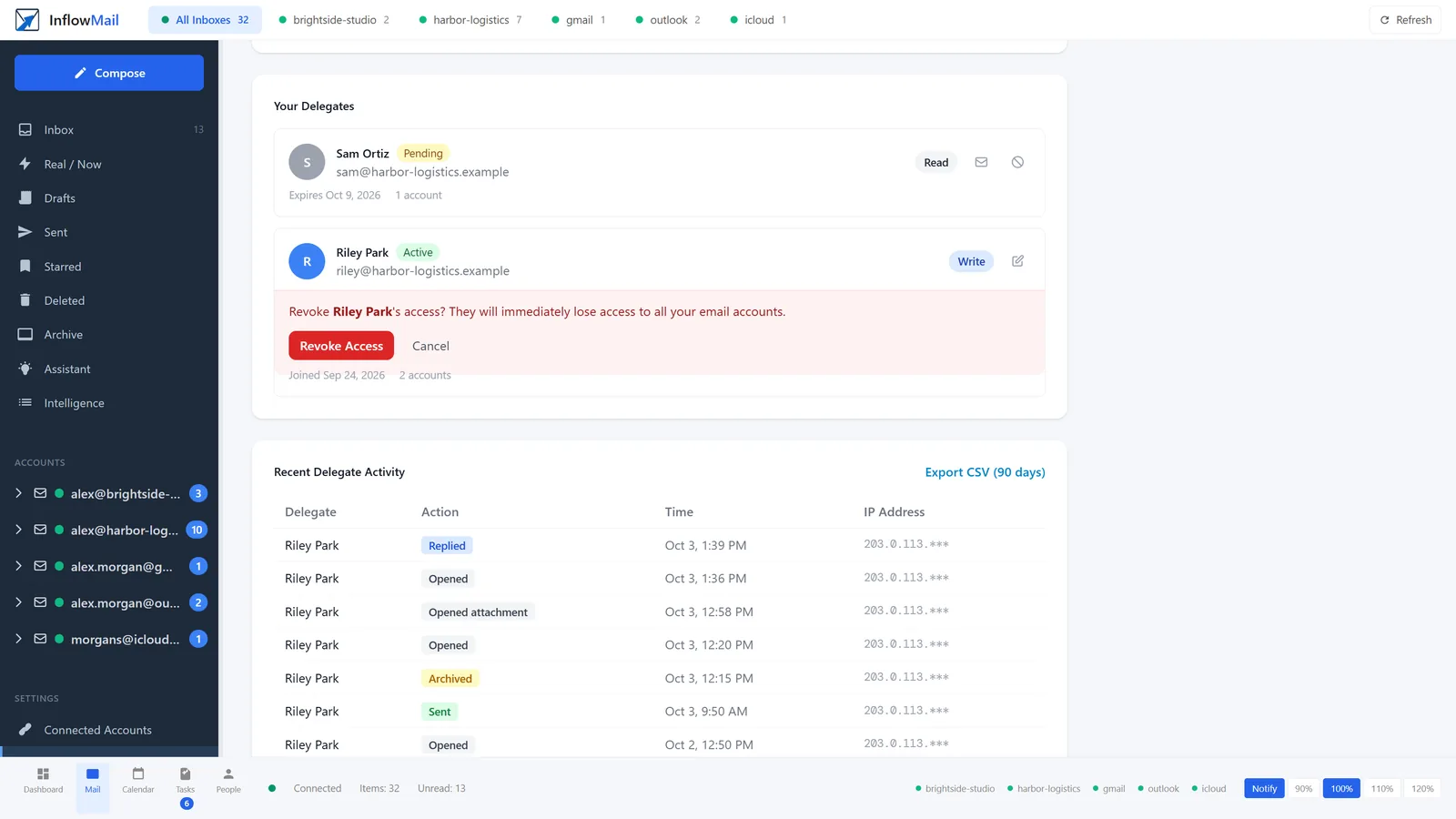
Revoke on Team Access and the helper's access to that owner's mailboxes ends at once, in the apps and the API. No password to change, no devices to re-sign.
Gmail, Microsoft 365 and IMAP
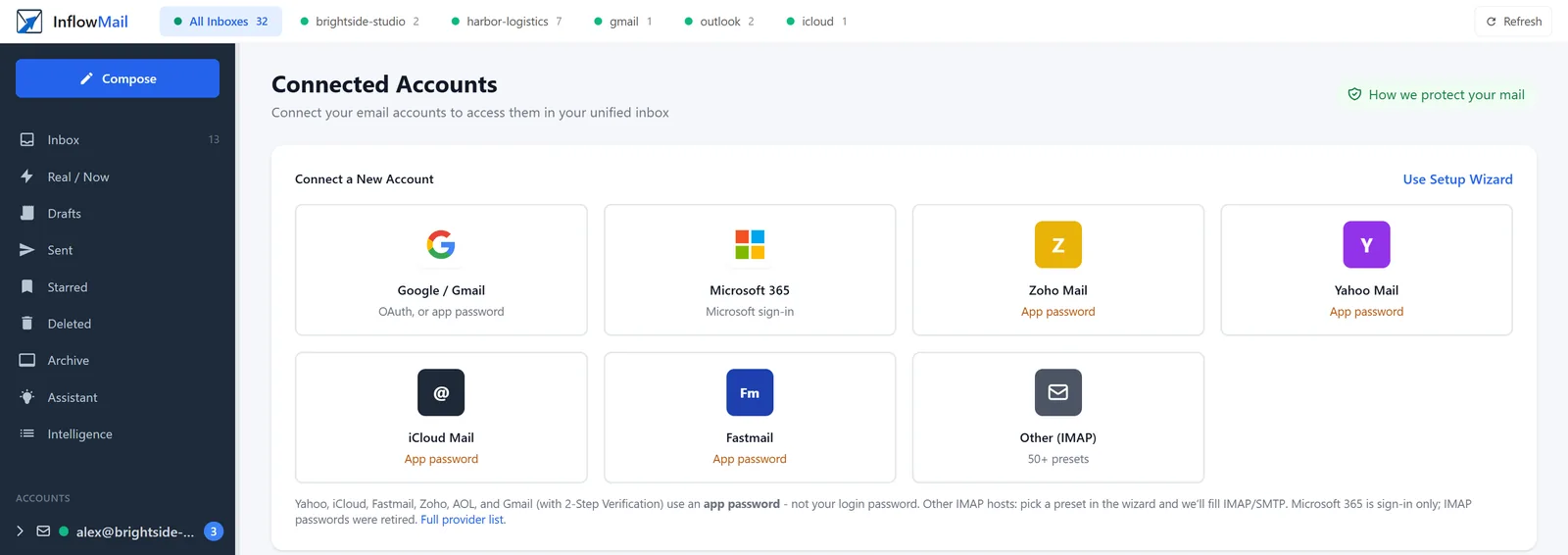
Google sign-in, Microsoft sign-in, or an app password for Yahoo, iCloud, Fastmail, Zoho and other IMAP hosts. One helper login covers all of them.
One helper, several clients
A VA or bookkeeper invited by three different owners signs in once and switches between their mailboxes. Each owner sees and revokes only their own grant.
Why not native delegation?
Sometimes it is the right answer. If the helper is a licensed user in the same Microsoft 365 tenant or Google Workspace domain, Send As, Full Access and Gmail delegation work and cost nothing extra. Use them.
Native delegation fits when
- Every helper already has a user and a license in the client's tenant.
- All the mailboxes are on that one provider.
- You are happy pulling mailbox audit records from the admin and compliance tools.
InflowMail fits when
- The helper is outside the firm: a VA, an outsourced bookkeeper, a contract paralegal. They get access without joining the client's tenant or taking a seat in it.
- The owner has mailboxes on more than one provider.
- The owner wants to read the log themselves: who, what, when, from where, as a CSV.
- Access has to end the day the contract ends, by the owner, without a ticket to you.
One thing to know: Microsoft and Google see these actions as the owner, through the InflowMail app. Which helper did it is recorded in InflowMail's log, not in the provider's.
Rights you turn on
Per person: one setting, Read or Write, on the mailboxes you tick for them. Billing, security, and connected-account OAuth stay yours.
Write today includes send, archive, and delete together. Split “send but cannot delete” is next if you need it.
What we log today
- Logged: every message a helper opens, sends, replies to, archives, moves, deletes, stars or snoozes, with the actor and the time, plus the IP address when they use the app or API.
- You see it: Team Access shows recent activity with a one-click CSV of the last 90 days; the API exports up to three years.
- Not logged: searches and inbox list views, and the IP address for actions taken in the web app.
We do not call this a SOC 2 report, a legal hold, or a DMS. It is “Riley sent as you at 3:14, from this IP.” That is already more than a shared password.
Setup, start to finish
Do it with the owner on a screen share. The owner signs in to their own account; you never need their password either.
- 1. Retire the shared password
Change the mailbox password and turn on MFA for the owner first. Changing it later can sign InflowMail out of the mailbox.
- 2. Owner account
The owner creates a free InflowMail account and turns on two-factor sign-in.
- 3. Connect mailboxes
Sign in with Microsoft or Google (OAuth), or add an IMAP box with an app password. If the tenant blocks user consent, an admin approves once: admin consent guide.
- 4. Invite the helper
Team Access: their email, Read or Write, the mailboxes they handle. They accept from their own inbox within seven days. Now the questionnaire answer is yes.
What to tell the client
“Right now everyone who helps with your email uses your password. If one of them leaves, or their laptop is stolen, your mailbox is exposed and we have to change it everywhere.”
“With this, each of them gets their own login. You choose which mailboxes and whether they can send. You can see what they did, and you can cut anyone off in one click.”
“Your mail stays at Microsoft and Google. Free covers one helper. Paid is $15 a month, plus $3 for each extra helper.”
Security, in short
- Delegated permissions only. Each mailbox owner signs in and grants access to their own mailbox. No tenant-wide application permissions.
- Encrypted. Stored data is AES-256 encrypted and connections use TLS. The tokens and app passwords that reach the mailbox are encrypted with a key unique to the owner's account. This is not end-to-end encryption: the service reads mail to sort it.
- Logged. The owner's Data Access Log shows when message content was opened through InflowMail, and every message a helper opens, sends or changes is in the activity log.
- No training on client mail.
- No certifications claimed. We are not SOC 2 or ISO 27001 certified. We run on AWS; AWS's data-center certifications are theirs, not ours.
Straight answers
Does the helper need a Microsoft 365 or Google Workspace license?
No. They need a free InflowMail login, not a user or a seat in the client's tenant. Access runs through the owner's connected mailbox.
Does this change the client's tenant?
Connecting a Microsoft 365 mailbox adds InflowMail as an enterprise application with delegated permissions for that user, as any OAuth app does. If user consent is blocked, an admin approves it once. No mail flow, DNS, licensing or user changes. Remove the app in Entra ID or Google Admin to cut it off.
What data do you store?
A synced, encrypted copy of the connected mailboxes for the plan's history window (14 days on Free, 90 days on Paid, more if bought), the encrypted OAuth tokens or app passwords, and the helper activity log. Mail stays at the provider. Deleting the account disconnects the mailboxes and erases our copy of their sign-in credentials straight away, then deletes the synced mail. Details on /security.
How fast is revoke?
Immediate. The next request from the helper is refused, an open app session drops out of the mailbox, and the helper gets an email that access was removed.
Can we export the audit log for the insurer or a client file?
Yes. Team Access has a CSV of the last 90 days: time, helper name and email, action, item, IP address and device. The API returns up to three years. Each owner exports their own mailboxes; there is no cross-client export yet.
What does it cost the client?
Free includes five mailboxes, 14 days of history and one helper. Paid is $15/mo with 20 mailboxes, 90 days and one helper; each extra helper is $3/mo, up to 10 helpers. Helpers do not pay.
Can I manage all my clients from one login?
Not yet. Each client owner has their own account and controls their own helpers. We are building the partner side; tell us what you need.
Does the helper need a paid seat?
They need their own InflowMail login. You have one helper included on Free and on Paid. Extra helpers are $3/mo (cap 10).
Can they see every mailbox I connect?
Only the ones you tick when you invite them. If you tick none, they get all of your mailboxes, and the invite screen says so before you send.
Will you train on our mail?
No.
Do you replace Gmail or Outlook?
No. Connect the mailbox. Mail still lives at the provider.
Partner program
Set this up for your clients
We are starting a partner program for IT consultants and MSPs. Tell us how many clients you look after and which providers they use.
Other ways people use helpers
Try it on your own mailbox first
Free forever includes five mailboxes, 14 days of history, and one helper. Paid is $15/mo when you need more boxes, 90 days, and the assistant.