AI sorts
the current.
Decades of email become a sortable current. AI scores every message by importance, urgency, and your past behavior - surfacing what matters, sinking the noise.
The gist, before you read a word
Open an email and a short summary sits on top: what they want and by when. Archive it, draft an AI reply, or tap Why? to see how it was classified.
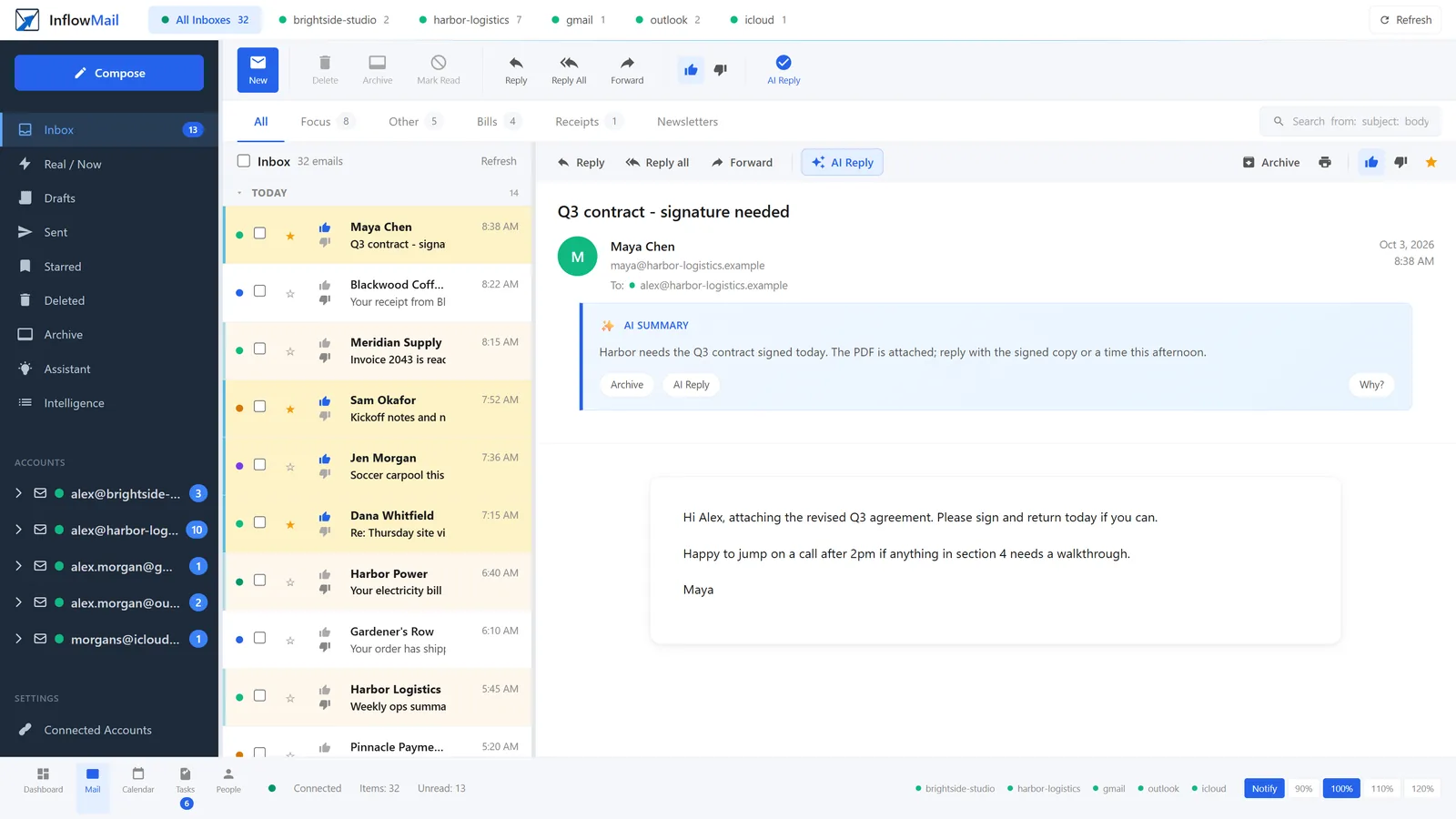
Important First, Noise Later
Our AI analyzes every incoming email and scores it based on sender importance, content urgency, your past behavior, and whether it actually needs a response. Important emails rise to the top. Newsletters and promotions get out of your way.
Replies Written in Your Voice
When an email needs a response, InflowMail's AI drafts a reply based on the thread context, your past replies to this sender, and the urgency of the request. Review, edit, and send - or let it go with one click.
Hi Sarah,
I'll have the Q4 report ready by Friday afternoon. I'll send it over by 4pm your time - let me know if you need it earlier.
Best,
Clint
- Contract review from Legal - expires today
- Sarah is waiting for your feedback
- Meeting confirmation for tomorrow
- Flight itinerary updated for NYC trip
- Monthly statement from Amex
- Project status update from dev team
Start Your Day Informed
Every morning, InflowMail's AI summarizes what happened overnight. What needs your attention? What can wait? What can you safely ignore? Get the full picture in 30 seconds instead of 30 minutes of scrolling.
- Delivered to your inbox each morning
- Customizable delivery time
- Click to jump directly to any email
The vendor (Acme Corp) initially proposed a 12% rate increase. After negotiation over 3 days, both parties agreed to 7%. Sarah Chen approved on behalf of Legal. Contracts being finalized this week.
Long Thread? Get the Gist.
47-email reply chain about the vendor negotiation? InflowMail summarizes it in 3 sentences. See who agreed, who objected, and what the current status is - without reading every reply.
Automatic Organization
AI automatically categorizes your email so you can focus on what matters. No rules to set up, no filters to maintain.
Work
Colleagues, clients, business communications
Finance
Bills, statements, receipts, transactions
Shopping
Orders, shipping, receipts, returns
Personal
Friends, family, social connections
Travel
Flights, hotels, confirmations, itineraries
Newsletters
Subscriptions, digests, updates
Promotions
Sales, deals, marketing emails
Automated
System notifications, alerts, cron emails
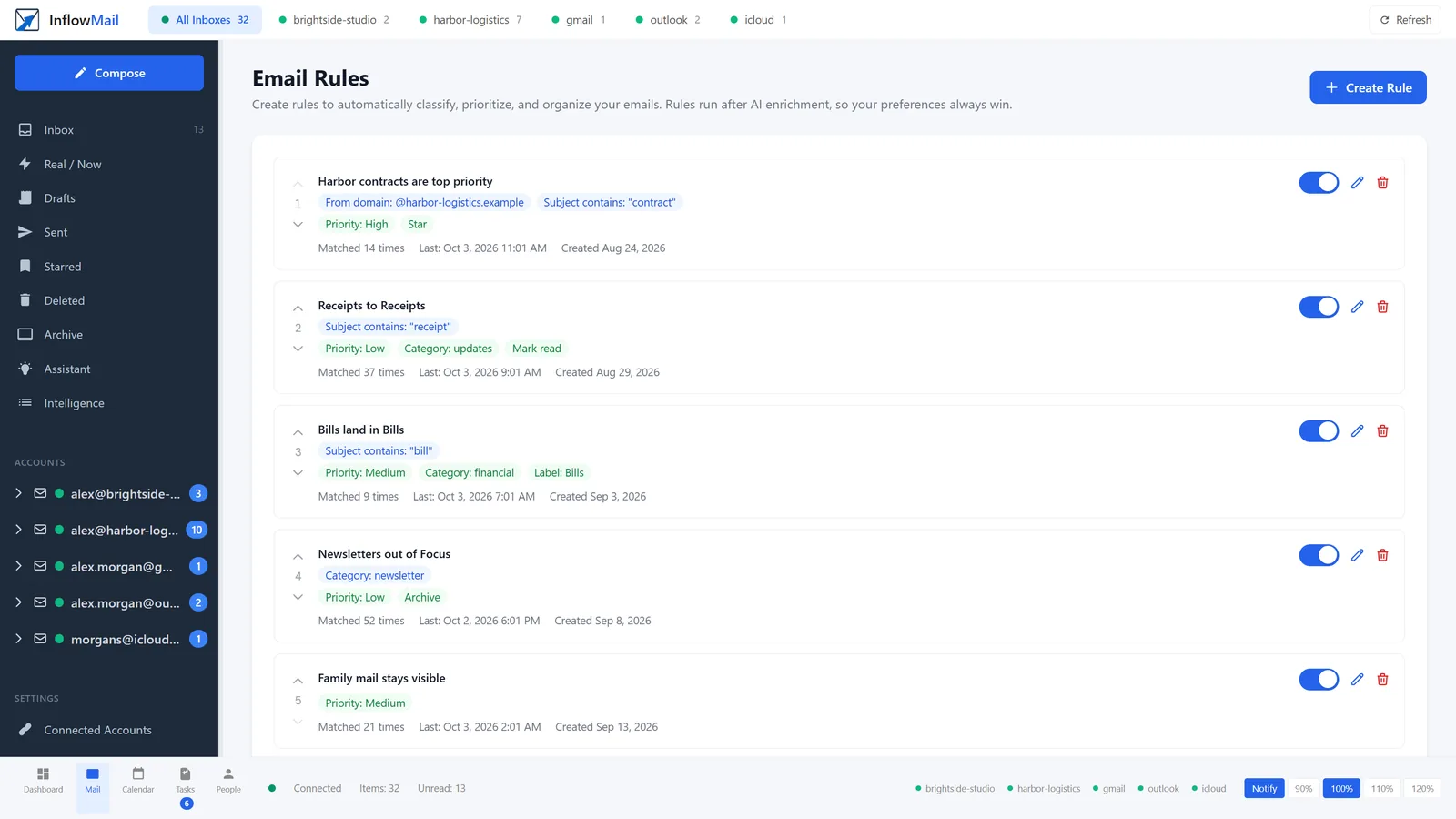
Disagree with the AI? Your rule wins.
You do not need rules - but when you want one, it reads like a sentence: mail from this domain with "contract" in the subject is high priority and starred.
Rules run after the AI, so your call always overrides it. Each rule shows how many times it matched and when it last fired, and you can switch it off or reorder it without deleting it.
Know Who You're Dealing With
InflowMail tracks sender patterns across your entire inbox. First email from a new domain? We flag it. Sender who always needs a fast response? We know. Domain that sends nothing but promotions? Dimmed automatically.
Claude, by Default
InflowMail defaults to Claude by Anthropic, run on Amazon Bedrock. Prefer OpenAI or Google Gemini? Bring your own API key and switch.
Choose Your AI Provider
Don't want to be locked into one AI? InflowMail supports Anthropic Claude, OpenAI GPT, Google Gemini, and xAI Grok. Use our AI, pick your favorite provider, or bring your own API key for full control.
Ask Questions About Your Emails
Use natural language to query your inbox. "What did John say about the deadline?" "Summarize the vendor negotiation." Get instant answers with links to source emails.
- ✓ Natural language questions across all your accounts
- ✓ Citations link directly to source emails
- ✓ RAG-powered by Claude AI
"What did the client say about the project deadline?"
Based on your emails, the client mentioned in their Dec 15th message that the deadline has been extended to January 31st due to holiday schedules...
Your Data Stays Yours
We built InflowMail with privacy as a foundation, not an afterthought. Here's exactly how we handle your email data with AI.
No Training on Your Data
Your emails are never used to train AI models. Classification happens in real-time and results are discarded after processing.
Encrypted at Rest
All stored email metadata is encrypted with AES-256. OAuth tokens are encrypted separately. We never store your email passwords.
Minimal Data Sent
Only email metadata (subject, sender, snippet) is sent to the AI for classification - not full email bodies unless you request a summary.
Delete Anytime
Request full data deletion at any time. We purge all your data within 30 days, no questions asked.
Bring Your Own Key
Use your own API key so classification, summaries and reply drafts run on your own provider account, billed to you and under your agreement with them.
Disable AI Anytime
AI features are optional. Turn off classification, summaries, or smart replies independently from your account settings.