Back to Features
Apps everywhere

Connect once.
Flow everywhere.

The worst part of email apps? Reconnecting every account on every device. Connect once with InflowMail. The same mailboxes show up on the web, in the Windows app, and on iPhone and iPad. The Mac app is next.

The Setup Nightmare

You know the drill. New phone? Re-authenticate every email account. New tablet? Same thing. That's 15 minutes of frustration, hunting for passwords, dealing with 2FA codes, just to check your email.

Traditional email apps
New device = reconnect every account from scratch
Password hunting
Which password was it? Where's that app password?
Different settings everywhere
Labels don't match, signatures are different
iPhone
4 accounts to connect
iPad
4 accounts to connect
Work laptop
4 accounts to connect
Home PC
4 accounts to connect
= 16 separate setups

Your Connections Live in the Cloud, Not on Your Device

This is what makes InflowMail different from every other email app.

Traditional Email App

iPhone OAuth x4 Gmail, Outlook...
Laptop OAuth x4 Gmail, Outlook...
Tablet OAuth x4 Gmail, Outlook...
Each device authenticates separately

InflowMail

All devices
InflowMail Cloud
InflowMail Cloud Gmail, Outlook, IMAP
Add a device in seconds. Tokens managed centrally.
InflowMail
One InflowMail Login
All your email, everywhere
iOS
Android
Web
All accounts synced automatically
Connect Once

The InflowMail Way

Connect your email accounts once on any device. Log into InflowMail on your phone, tablet, or computer - all your accounts are already there. Settings, labels, and preferences sync automatically.

  • One login, all devices
  • Settings sync across devices
  • Add new device in seconds
  • Secure OAuth - we never see passwords

Available Everywhere

Windows

Native desktop app, distributed through the Microsoft Store. Learn more

Get it from Microsoft

iPhone and iPad

The iPhone and iPad app is ready for the App Store. Until that page is public, use the web app in Safari.

Use the web app
Android

Not on the Play Store yet. The web app in Chrome has the same inbox.

Use the web app

Web App

Full-featured web app, works in any browser

Open Web App
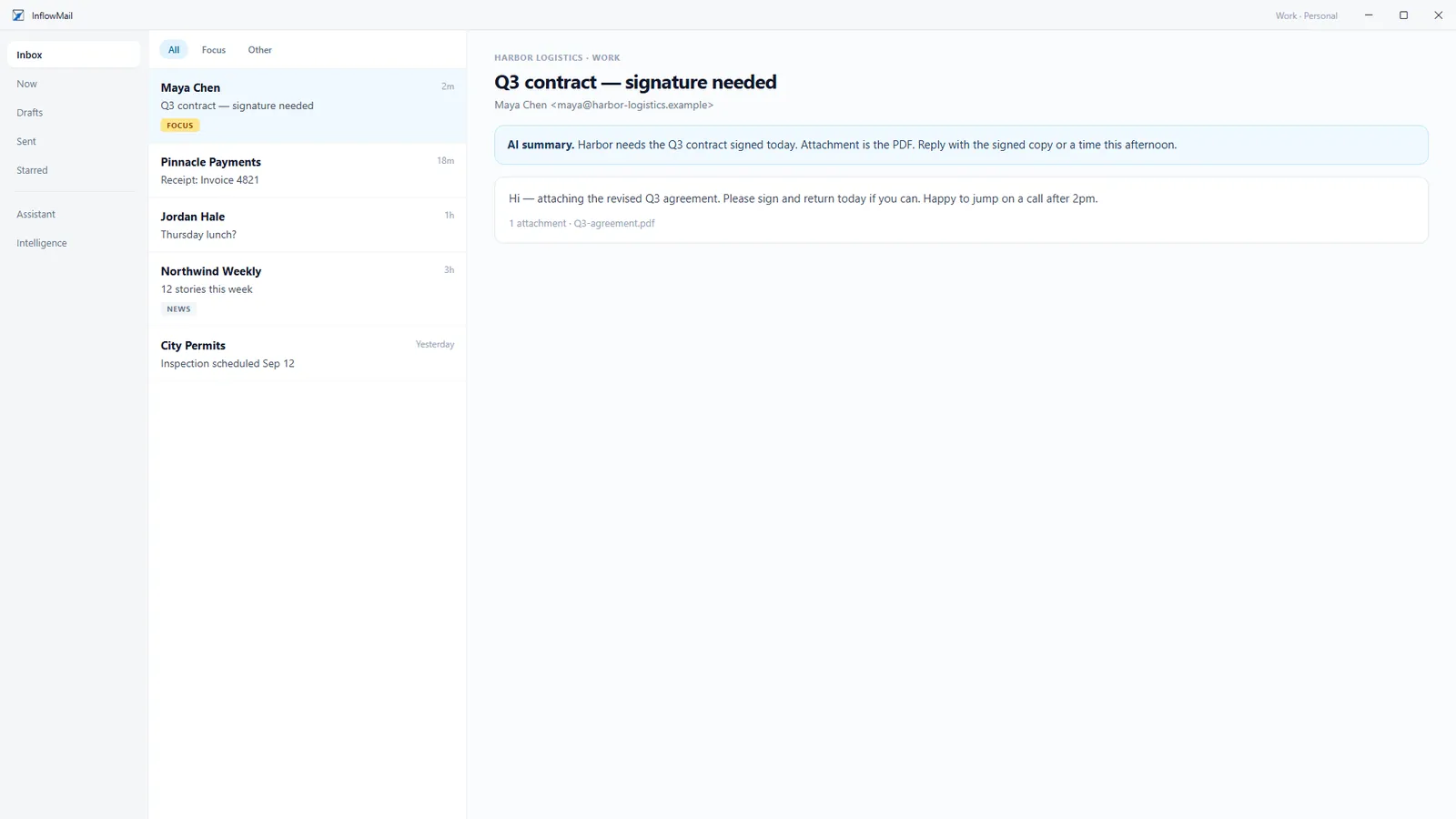
InflowMail for Windows showing a unified inbox: a message list with Focus and Other tabs and a reading pane with an AI summary of a contract email
Desktop App

A Native Windows App That Feels Right

The InflowMail desktop app for Windows gives you a dedicated email window outside your browser, with the same account and mailboxes as the web app. No tab juggling, nothing to reconnect.
Dedicated window
Lives outside your browser - no more lost tabs
New-mail alerts
New messages pop up in the app as they arrive, with one-click copy for sign-in codes
Fits your screen
Zoom from 90% to 120%, and light, dark, or follow Windows
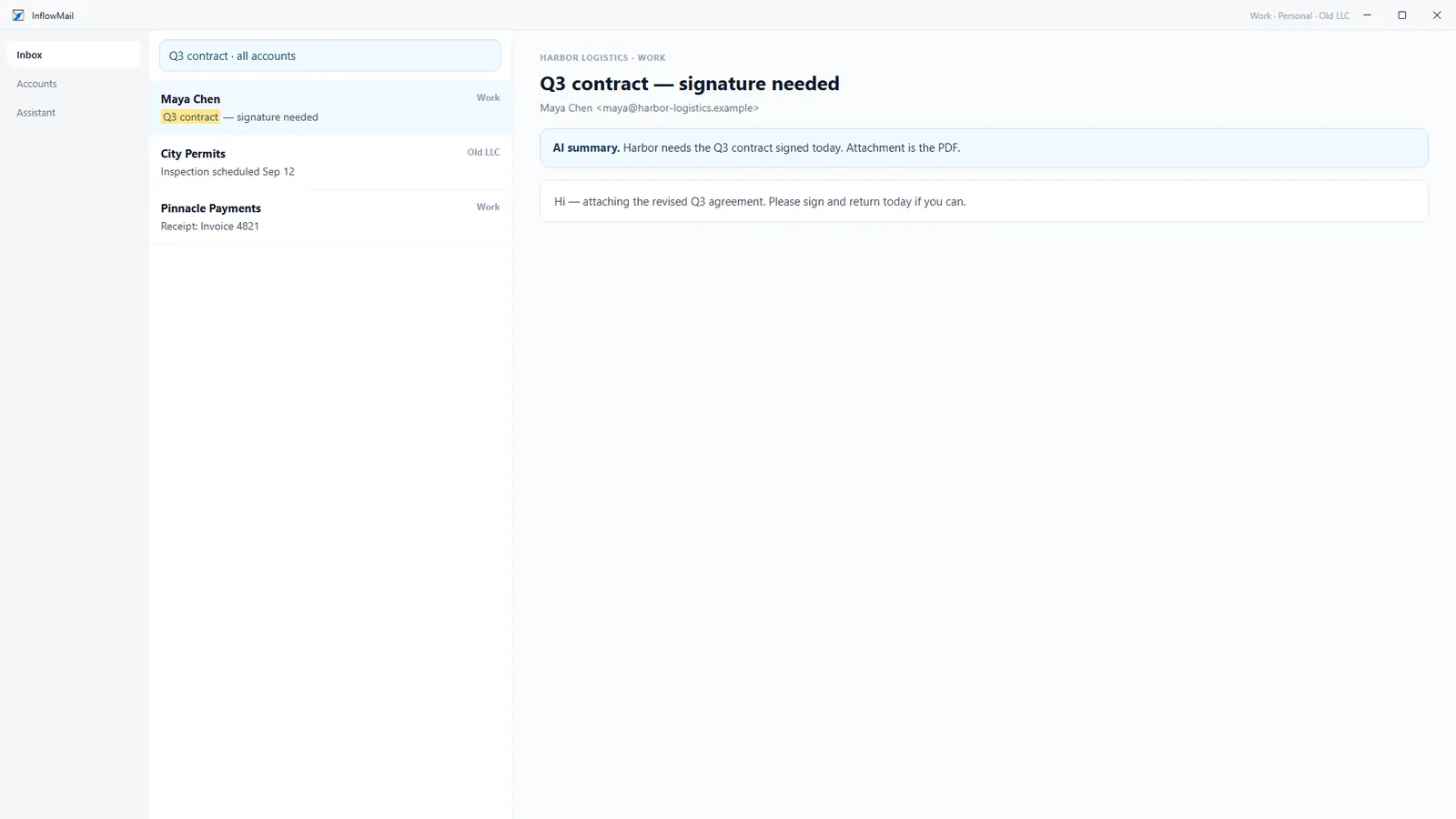
Searching for Q3 contract across all accounts, with results from the Work and Old LLC mailboxes
Search every mailbox at once
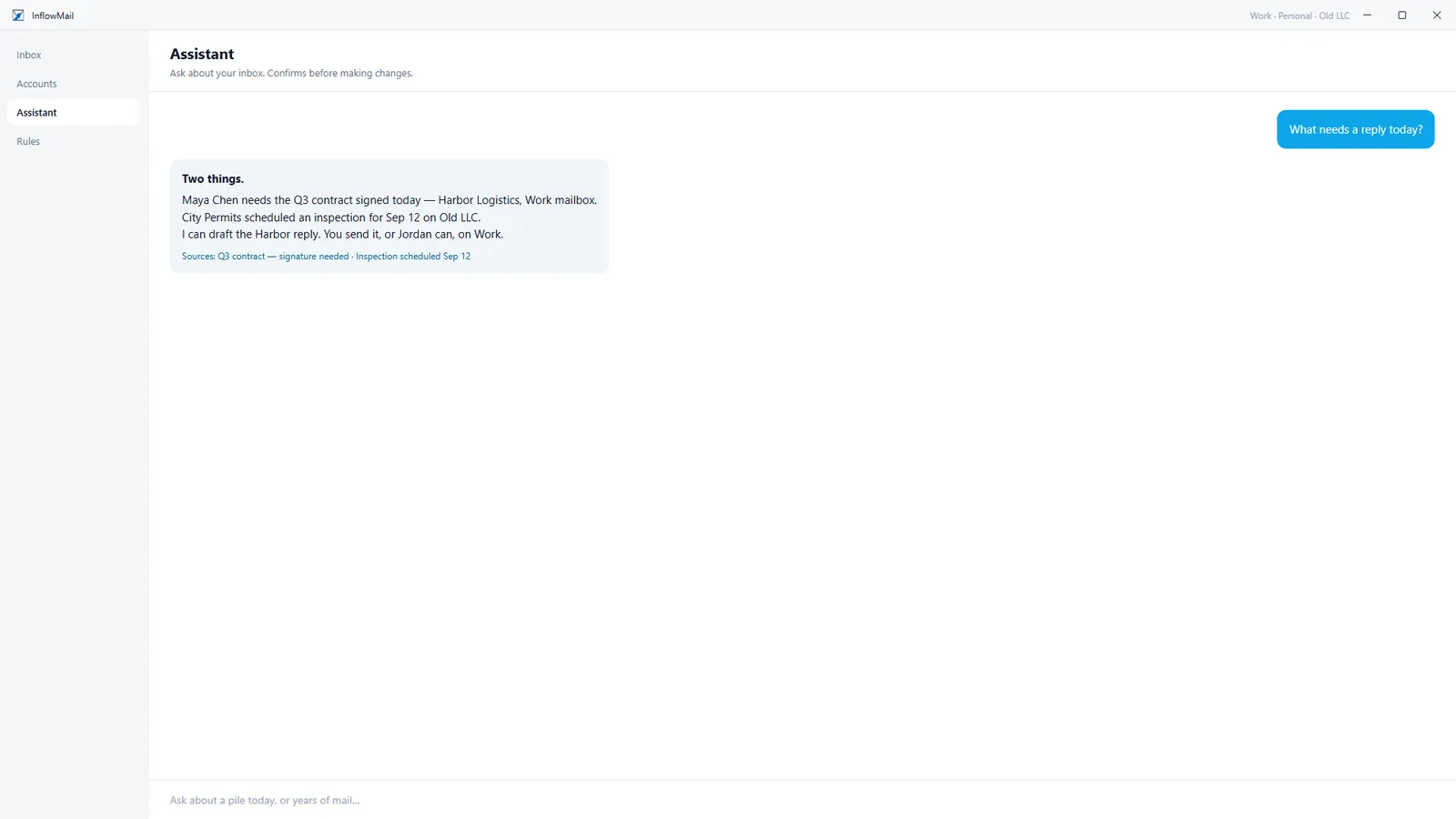
The Assistant answering what needs a reply today, citing the emails it used as sources
Ask the Assistant what needs you

What's Next

We're building InflowMail for every platform. Here's what's in the pipeline.

Coming Soon

Browser Extension

Quick reply and AI triage right from Gmail or Outlook's web interface, without leaving your browser tab.

Next

Mac App

The Mac app is next. Until it ships, use the web app on a Mac. There is no Linux desktop app.

Pro + Power

API Access

Build your own integrations. REST API with webhook support for custom workflows and automations.

Seamless Sync

Pick Up Right Where You Left Off

Read an email on your phone during your commute. Sit down at your desk and it's already marked as read. Star something on the web and it's starred on every device. InflowMail keeps your entire email state synchronized in real-time across all your devices.

Real-time sync
Read status, stars, labels, and folders sync across all devices instantly
Offline access
Read cached emails and compose drafts offline - everything syncs when you reconnect
Settings follow you
AI preferences, rules, signatures, and labels are the same on every device
Phone
Synced
Tablet
Synced
Desktop
Synced
All devices in sync, always

Apps FAQ

Which platforms does InflowMail support?
Web app in any modern browser. The Windows app is in the Microsoft Store (see the Windows app guide). The iPhone and iPad app is ready for the App Store. Until that page is public, use the web app in Safari. Android is not on the Play Store yet, so use the web app in Chrome. The Mac app is next; until it ships, use the web app on a Mac. Linux uses the web app or a PWA.
Is there a Linux desktop app?
Not yet, but the web app works great on Linux with any modern browser. A dedicated Linux app is on our long-term roadmap. In the meantime, you can install the web app as a Progressive Web App (PWA) on Linux for a native-like experience.
Does it work offline?
The Windows desktop app and the web app need a connection to sync and send. Mail you have already opened stays readable if the network drops. Offline compose-and-send-later is not a launch feature.
When will mobile apps be available?
Native iOS and Android apps are in development and not in the App Store or Google Play yet. In the meantime, the InflowMail web app is fully responsive and works great on mobile browsers.

Your Email, Anywhere

Connect once, access everywhere. Get started free.

Get started free