Back to Features
Unified Inbox

Many streams.
One channel.

Stop switching between Gmail, Outlook, Yahoo, iCloud, and work IMAP. Every account flows into one channel on the web, on Windows, and on iPhone and iPad. The Mac app is next. Connect once, no re-setup on every device.

The Multi-Account Nightmare

Sound familiar? You have your personal Gmail, your work Outlook, maybe a Zoho account for your side project, and that old Yahoo account you can't abandon. Every morning you're checking 4 different apps, missing important emails because they're in the "wrong" inbox.

Constant app switching
Wasting time jumping between email apps
Missing important emails
Urgent message in the account you didn't check
Different interfaces
Each app works differently, muscle memory fails
Gmail - 47 unread
Outlook - 23 unread
Zoho - 12 unread
Yahoo - 156 unread
Four apps. Four unread piles.
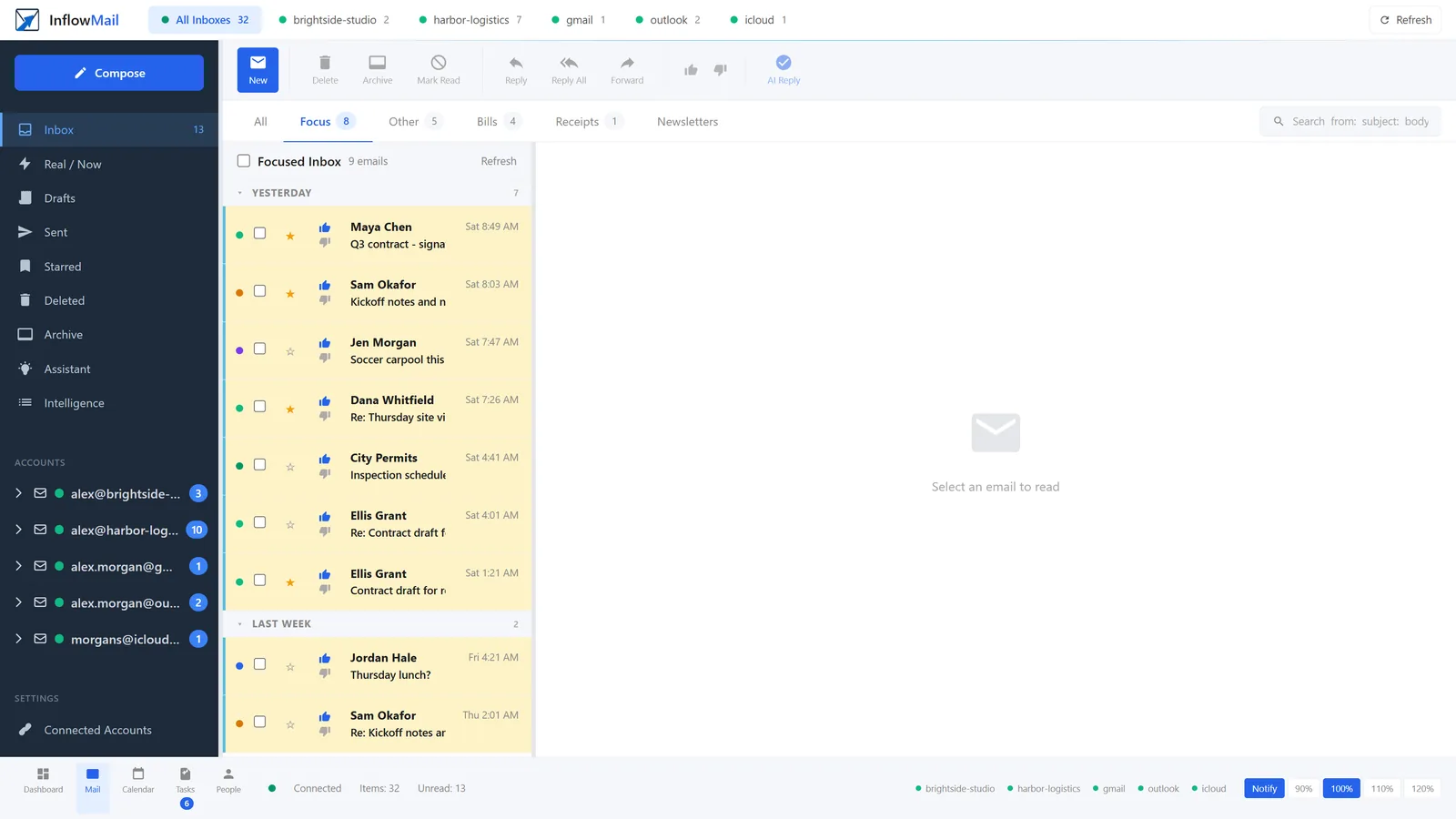
The InflowMail inbox on the Focus tab: five connected mailboxes listed in the sidebar and as tabs along the top, with the important emails from all of them in one highlighted list.
The same inbox after those accounts are connected: five mailboxes, one Focus list. Real app, demo mail.
InflowMail Unified Inbox Work + Personal
Q3 contract - signature needed
Maya Chen · Harbor Logistics · Work
2m
Receipt: Invoice 4821
Pinnacle Payments · Personal
18m
12 stories this week
Northwind Weekly · Newsletters
3h

The InflowMail Solution

One login. One interface. All your email. Connect your accounts once and never think about which app to check again. Your most important emails rise to the top, regardless of which account they came to.

Unified view across all accounts
See everything in one place, sorted by importance
Account-specific views
Still see individual accounts when you need to
Send from any account
Reply from the right email address automatically
Per-Account Views

One View or Five. Your Choice.

The unified view is the default, but sometimes you need to focus on a specific account. Click any account in the sidebar to see just that inbox - perfect for when you need to respond from a specific address or check a client-specific mailbox.

Switch accounts instantly
Reply from the correct address automatically
See unread counts per account
Accounts
All Inboxes 238
Gmail 47
Outlook (Work) 23
Zoho (Side Project) 12
Project update from Sarah
via Gmail
Q4 budget review
via Outlook

How Folder Merge Works

Your inboxes stay separate at the provider level. InflowMail merges the view, not the data.

Before
G
Gmail Inbox
47 unread
O
Outlook Inbox
23 unread
Z
Zoho Inbox
12 unread
3 separate apps, 3 separate views
After
Contract Review ASAP
Legal Team · Gmail
2m
Q4 Budget Review
CFO · Outlook
15m
New order #4521
Shopify · Zoho
1h
1 inbox, sorted by importance
New Reply
Auto-detected
Replying to an Outlook thread - sending from Outlook
Smart Reply Routing

Always Send from the Right Address

When you reply, InflowMail automatically selects the right From address. Reply to a Gmail thread and it sends from Gmail. Reply to an Outlook conversation and it sends from Outlook. No more accidentally sending work replies from your personal account.

Auto-selects correct send address
Prevents cross-account reply mistakes
Override anytime with the From picker

Connect Any Email Provider

Gmail, Microsoft 365, Outlook.com, Zoho, Yahoo, iCloud, or any IMAP server - if you can send and receive email, InflowMail can connect to it.
Gmail
Microsoft 365
Outlook
Zoho Mail
Yahoo Mail
Any IMAP
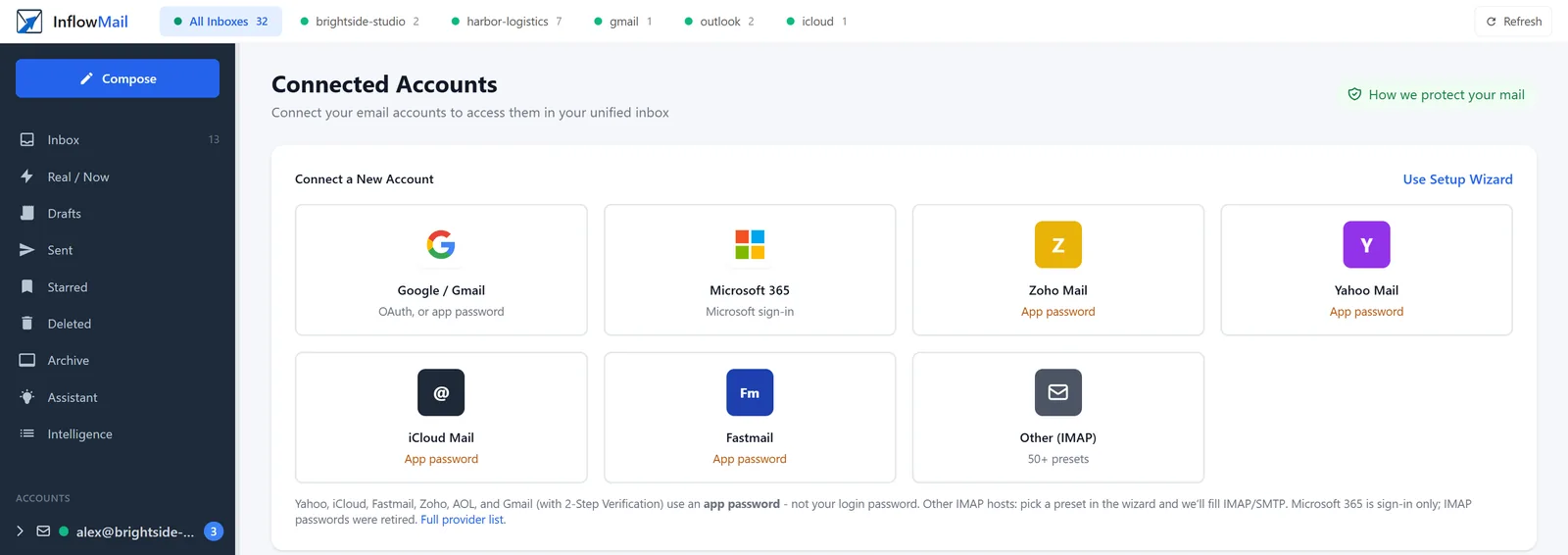
Connected Accounts screen with a tile for each provider: Google / Gmail, Microsoft 365, Zoho Mail, Yahoo Mail, iCloud Mail, Fastmail and Other (IMAP) with 50+ presets. Gmail uses Google sign-in or an app password, Microsoft 365 uses Microsoft sign-in, and the others use an app password.
Adding a mailbox: Gmail with Google sign-in (or an app password), Microsoft 365 with Microsoft sign-in; Yahoo, iCloud, Zoho and Fastmail use an app password; other hosts pick an IMAP preset.
Visual Organization

Know Where Every Email Came From

Every email in your unified inbox shows a color-coded provider pill so you always know which account it belongs to. Red dot for Gmail, blue for Outlook, green for Zoho - instant visual context without opening the message.

Gmail accounts shown in red
Microsoft 365 / Outlook in blue
Zoho, Yahoo, IMAP in custom colors
Customizable colors per account
Quarterly report from Sarah
Gmail
Team standup notes
Outlook
New order notification
Zoho
Password reset request
Yahoo

Get Started in 3 Minutes

1

Sign Up

Create your InflowMail account. No credit card needed.

2

Connect Accounts

Add your email accounts with secure OAuth. We never see your passwords.

3

Enjoy Unified Email

All your email in one place. AI starts learning what matters to you.

Frequently Asked Questions

How many email accounts can I connect?
Free includes 5 email accounts and keeps 30 days of mail. Pro is $9/mo for 5 accounts, 90 days, and the assistant - extra mailboxes are $1/mo each, up to 50. Each account can be Gmail, Microsoft 365, Outlook.com, Yahoo, Zoho, iCloud, or any IMAP server.
Which email providers are supported?
OAuth for Gmail and Microsoft 365. App-password IMAP for Yahoo, iCloud, Zoho, Fastmail, and 50+ others (GoDaddy, Namecheap, Titan, GMX, and more). Any IMAP host works. See the full list. Proton Mail, Tuta, and HEY do not offer IMAP to a cloud client, so those cannot connect.
Is sync real-time?
InflowMail syncs your accounts every 30 seconds when you are actively using the app. New emails typically appear within a minute. For Gmail and Microsoft 365, we use their push notification APIs for near-instant delivery of new messages.
Can I use custom domains?
Yes. If your custom domain email is hosted by Gmail (Google Workspace), Microsoft 365, or any IMAP provider, InflowMail can connect to it. Your custom domain address will appear as-is in the From picker when composing.
What about shared mailboxes?
Shared mailboxes (like [email protected]) can be connected as a regular account. For Microsoft 365 shared mailboxes, you'll need appropriate permissions in your organization. You can also use the delegation feature to give team members access to specific accounts without sharing credentials.

Ready to Unify Your Inbox?

Join thousands who've simplified their email. Free for 5 inboxes.

Get started free